
Please choose the link below that interests you.
Benefits of RightFax
How To Fax from a Ricoh Device
How To Fax from a Lexmark Device
RightFax Support
Benefits of RightFax
Significantly Increase Employee Productivity
RightFax increases efficiency by eliminating time-consuming printing, manual faxing, and tracking.
Get Quick ROI with Back-office Document Delivery
RightFax makes it easy to integrate, automate, and deliver documents from SAP, Oracle, Microsoft, and nearly any system or application. This brings down the high cost of delivering documents, improves productivity, and boosts security and compliance.
Lower Telecommunications Costs
Use fewer phone lines by consolidating phone resources for faxing with RightFax. Leverage your IP/Unified Communications infrastructure. Take advantage of lower-cost telecommunications with SIP Trunking.
Eliminate Paper-related Overhead
Stop paying for fax paper, cartridges, and machine maintenance. RightFax also eliminate the costs of filing, long-term archival, and manual retrieval of paper faxes.
Prevent Expensive Audit Failure
Non-repudiable audit trail and reporting make it easy to provide proof of compliance. RightFax privacy and security enable adherence to industry-specific regulations.
Leverage your Existing VoIP Infrastructure
RightFax with Fax over IP (FoIP) extends the utilization of your VoIP/Unified Communications backbone by integrating fax.
Lower TCO through Virtualization
RightFax and FoIP can be run virtually, employing your existing environment for performance optimization, load-balancing, redundancy, and disaster recovery.
Increase Survivability of Business-critical Operations
The OpenText RightFax Shared Services module offers a unique, multi-server architecture for load-balancing, scalability, and redundancy that works with or without virtualization.
Save Time by Faxing from your Favorite Applications
Any document that can be printed from your Windows desktop can be faxed with RightFax, including Microsoft Office documents. If you know how to print, you know how to fax.
Make Faxing as Easy as Email
Use your email client to send and receive faxes to save time and keep all communications in one place. RightFax works with any SMTP mail client, and provides advanced integration into Microsoft Exchange and Lotus Notes.
Re-enable Multifunction Printers (MFPs) and Devices
Securely send faxes from your MFPs without purchasing phone lines and costly fax kits for each device. RightFax works with nearly any MFP, and provides advanced control panel integration.
Bypass Overnight Couriers with Certified Delivery of any File Type
The OpenText RightFax Secure Documents Module delivers PDFs via encrypted and certified delivery, with a complete audit trail. RightFax can also deliver large files of any type in their native format via certified delivery.
Avoid Theft and Snooping
Faxes are point-to-point data transmissions to verified recipients. Faxes do not sit or spool on the Internet and cannot be infected with viruses or malware. RightFax document control limits visibility of received faxes to the recipient only.
Get the Right Information to the Right People Right Away
RightFax can automatically deliver faxes to only the intended recipient via a variety of routing methods, including DID, group distribution, barcode routing, OCR routing, and more.
Stop Wasting Time Hunting for Paper Faxes
RightFax can deliver faxes as text-searchable PDFs. The RightFax Archiving Bundles provide rapid full-text search through massive archives, as well as granular regulatory compliance options. RightFax also integrates with imaging/archiving systems.
Support your Green Initiatives
RightFax removes a great deal of paper from your organization. Aside from removing the fax paper printed by machines, RightFax removes the need to print documents and cover sheets solely for faxing. It can also reduce power usage.
Gain Assurance that your Document Delivery Solution can Grow
Start with the RightFax add-on modules, connectors and fax channels you need, and add capability as your business grows.
Enjoy the Relaxing Confidence of Deploying the Market-leading Solution
RightFax has dominated enterprise fax for nearly a quarter century. RightFax is #1 in network fax, #1 in FoIP, and the fastest-growing provider of FoIP.
Video: How To Fax from a Ricoh Device
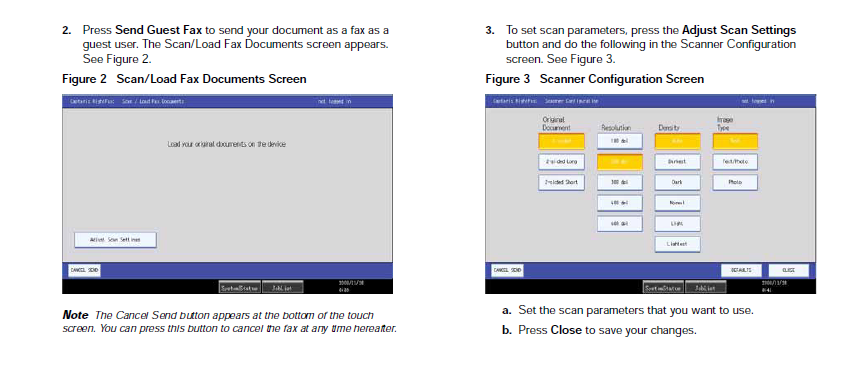
NOTE: Within the University of Kentucky environment users will not log onto the devices but rather will send all faxes as a guest user via the "Send Guest Fax" button.
Ricoh User instructions:



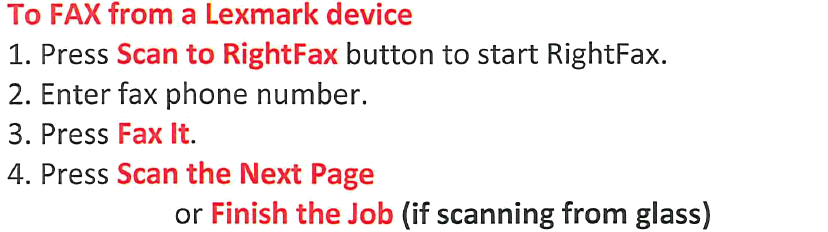
Lexmark User Instructions
Faxing from a Lexmark device is a very similar process to faxing typical faxing using the phone line. Please refer to the steps listed below to fax utilizing the RightFax solution.
Campus RightFax Support Contact Information
ukmps@uky.edu
NOTE: ALL RightFax devices should have directions attached to each machine that uses it. If you notice the directions are not clearly displayed, you may notify UK Managed Print Services at 323-5757 or email ukmps@uky.edu